Take-home assignment
The problem wasn’t missing permissions. It was missing roles.
A Roles, Members and Teams console for Figma admins, built as a working prototype in about 5–6 hours.
Enterprise SaaS · Access control · Design engineering

About this project
Role
Just me. Research, information architecture, design, the prototype and this write-up.
Context
A take-home for a product designer role. The brief was admin permissions for Jira or Figma, and I picked Figma. This is my own redesign, not anything Figma has asked for.
Time
About 5–6 hours, from first sketch to a working prototype.
Built with
Claude Code, React, TypeScript, Tailwind and shadcn/ui.
How I built it
The brief asked for wireframes. I built a clickable prototype instead, with Claude Code, because a permissions screen is all about states: empty, blocked, confirmed. I kept a dated log of every decision as I went.
Claude got a few things wrong. It cited a precedent I hadn’t looked into, missed a layer of Figma’s hierarchy, and described a folder-level feature I never built. I caught each one and fixed it. I also gave up the static frames the brief asked for, so you get a link instead of a file.
The problem
If you’re a Figma admin, you’ll know this. To give someone the right access you go through team settings, folder settings and the share dialog, and pick View or Edit each time. There’s nowhere to say “this person is a PM”. So you work it out again for every new person, and it’s easier to give too much than to get it exactly right.
It hurts most in four places: when someone joins, when someone asks for more access, when someone from another team needs in, and when you have to take access away. That last one is the riskiest, because the access is spread across so many places.
I’ve never been a Figma admin. I’ve only been on the other side, sharing files myself and asking an admin for folder access. So this comes from Figma’s help docs and my own experience, plus a look at Canva, where paid plans have reusable groups. That’s the closest thing I found.
Figma works person by person. There’s no role to hand out.
Figma does have a permission system. What it doesn’t have is a layer of reusable roles on top of it, which is how most other tools handle this.
1. Roles you can build, not two fixed ones
The brief named Designer and PM, so I started with two fixed templates. Then I asked the hiring contact one question to check what they wanted. The answer was role-based access control, with creating, managing and assigning roles.
So I built a role builder, with Designer and PM as the two built-in examples. That cost me a bigger build. Every new role means choosing permissions and dealing with the people who already hold it.
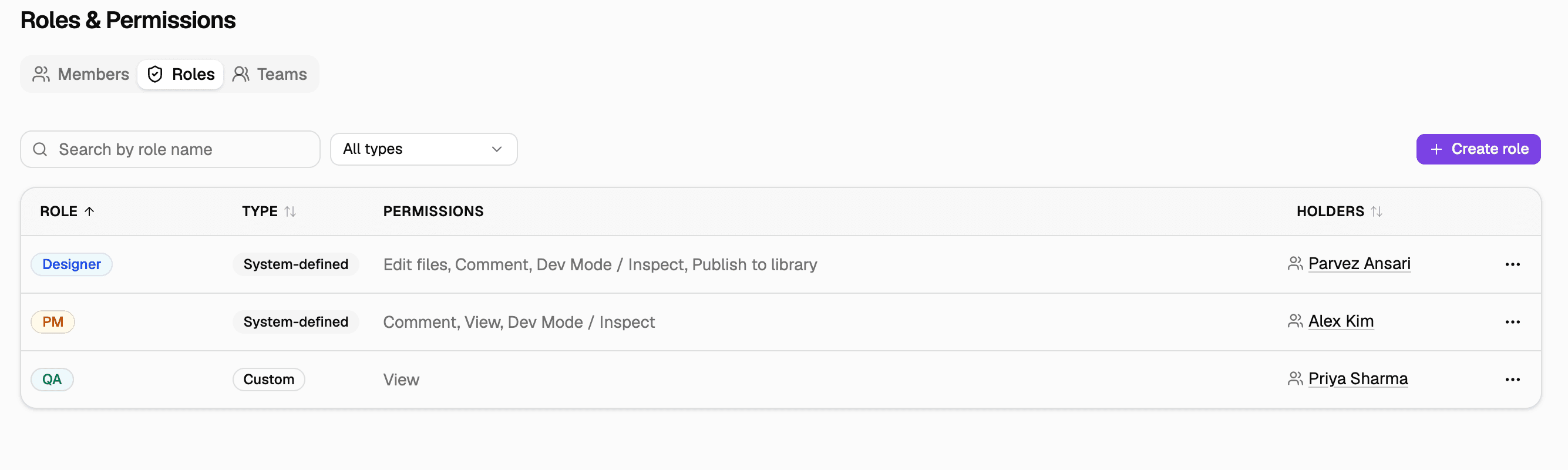
The Roles tab showing Designer and PM as system roles and QA as a custom one.

The create role dialog with five permission checkboxes.
2. A person’s own role beats their team’s
Someone can be on the Design Team and still have a role of their own. Say Priya is on the Design Team but is doing QA on this project. Which role does she get? I went with her own.
It’s the same “more specific wins” idea Figma already uses when a folder overrides a team. If the team always won, giving someone their own role would be pointless.
It does read backwards at first. I got it backwards myself when I looked at that row. That’s why the Members table has a Source column saying where each role comes from, and why the add member form tells you what role the team already has.

The Members tab showing the four ways a person can get a role.

The add member form showing the Design Team’s role is Designer.
3. Make deleting hard, and editing visible
Deleting can’t be undone, so I made it hard. You can’t delete a role someone still holds. The dialog tells you who has it and only offers Close.
Editing is different. Changing a role once for everyone is the whole point, so I didn’t block it. The dialog just shows who it will affect. The built-in roles are locked, with Duplicate if you want a variation. Otherwise “Designer” could end up meaning anything.

The delete dialog for a role someone still holds, with only a Close button.

The edit role dialog saying who currently holds the role.

A system role’s menu with Edit and Delete greyed out and Duplicate available.
How it fits together
A role is a bundle of five permissions: edit, comment, view, inspect and publish to library. A team has one role. A person can be on one team and can also have a role of their own. Their effective role is their own, otherwise their team’s, otherwise nothing.
Having no role is deliberate. New people start with no access until an admin decides, because handing out a default role would bring back the over-permissioning I started with.

The Teams tab. Each team carries one role.
What I left out
Bulk actions, people on more than one team, stacked roles, a workspace-wide console, and changes to Figma’s share dialog.
Bulk actions and stacked roles each need a rule or a feature of their own, and I only had a few hours. The share dialog would use these same roles, so I left it for later. I also dropped my first idea of giving one person different roles on different folders.
What I haven’t tested
Nobody has used this yet, not even a Figma admin, so there are no numbers.
With a few more hours I’d put it in front of two or three admins and give them two tasks: set up a new hire, and tell me why a given person has the access they have. If they get it right without help, the Source column and the own-role-wins rule are doing their job.
What I’d do differently
Talk to an admin before building anything. Everything here comes from my side of the table. I also picked Figma because I knew it well, and I didn’t study the company’s own product first. Next time I’d start there.
Figma lets you say who can edit a file. It doesn’t let you say who someone is. I designed the role layer and built it so you can try to break it.
Open the live prototype